Silicon Valley Technology Commentary & Archives · Est. 2006 3,033 Posts · 2006–2026

September 4, 2008

September 4, 2008 · 3 MIN READ · BY LOUIS GRAY

The iPhone's Missing Link: User Profiles

The iPhone's Missing Link: User Profiles

By Jesse Stay of Stay N' Alive (Identi.ca/FriendFeed)

The iPhone has quickly become one of the most popular and sophisticated devices on Earth. With a very unique and natural interface, quality camera, GPS, tilt controls, and a full developers API and App marketplace, it's no wonder it's quickly approaching to be one of the most widely used phone platforms on the planet. With 3.3 billion people having a cell phone subscription, and cell phone coverage to cover over 90% of the earth by 2010, there's no arguing that we are approaching one of the most powerful platforms known to man.

The Need for a User Profile

I mentioned back in July that Facebook is missing some serious features to make it a serious platform itself, including privacy controls. It's clear that the iPhone has the potential to actually form one of the world's largest Social Networks, with GPS support, a contacts list (which are your real life friends), and applications that can access that data and communicate back and forth. With such a network monetization potential goes through the roof! However, there is one thing missing that I think would complete the mix - profiles.

Turning Customers Into People

Right now, Apple and AT&T know you have a phone. They know your name from your billing information and where you are from GPS information they gather as you talk on your phone. However, that's about all they know - to them, your phone is a phone, and you're just another customer.

What would turn each of their customers into actual people would be to build actual profiles, on the phone, for each person that owns the phone. This could be done either locally on the phone, or perhaps via account settings at either AT&T or Apple that sync with the phone. They could collect such information such as gender, marital status, religion, interests, favorite media, favorite books, education, work, and other information about you to identify who you actually are, in addition to your location. This information would follow the phone and be made available (with Privacy controls, of course) via an API, and then, any service that would like this information about the user could retrieve this information and bring actual people into their services.

The iPhone Could Prove Identity

Imagine the identity implications here. The iPhone follows you, where you go. In essence, it in many ways is a part of you, and your identity. What if Apple were to require identification to authenticate you as a real person, then store that information, encrypted, to share with others to prove who you are. I imagine some better authentication and security would be needed on the iPhone to keep this safe. However, with such identity possibilities, we could very well see our paper licenses and passports and identification be a thing of the past!

As a disclaimer, I've just started serving as the Chief Community Officer for a startup writing a new iPhone Entertainment application (we have a launch coming soon!), but I can tell you, if the iPhone were to already collect this information from the user for us, we'd have quite a useful app on our hands! Having a real identity to associate with each user, where they are at any moment is very powerful. Relationships are important, but before relationship can happen, each part of that relationship must have identity. That's why the iPhone needs to have a Profile.

Read more by Jesse Stay at Stay N' Alive.

September 4, 2008 · 2 MIN READ · BY LOUIS GRAY

Social Median Revamps and Introduces "News Streaming"

Social Median Revamps and Introduces "News Streaming"

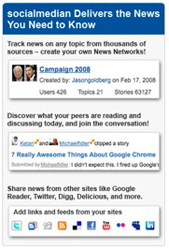
On Saturday, I prematurely announced Social Median's integration of Google Reader shares into the social news discovery service. Turns out my account had been hard-wired as one of the initial users testing new features aimed to make the site ingest even more information and making it a more essential part of my daily activity. Today, Social Median filled in the rest of the puzzle, by adding support for data not just from Google Reader shares, but also Twitter, Digg, Delicious and FriendFeed. Additionally, Social Median rolled out tools for bloggers to highlight their activity on the site from their own blogs, and a number of ways to find the most popular and active content. The result? A more robust site, aimed to move beyond "lifestreaming" and more to "news streaming".

In speaking with CEO Jason Goldberg last night, he said there are already many sites, like FriendFeed, that do a great job of showing your activity on other sites, and enabling discussion. But Social Median is instead focused on determining which of those activities you have on other sites that are relevant as "news", based on keywords, and topics you have opted to follow. Social Median has to do the hard work of sharing the "news" updates with the right people and the right topical news networks on the site.

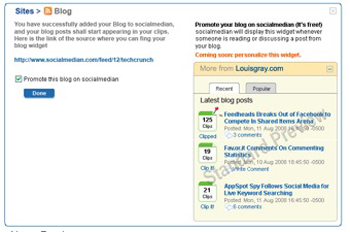
Like other aggregation sites, Social Median now features an "Add links and feeds from your sites" option, enabling you to add hooks to your third party services. Users can then specify if you want all your updates flowing through Social Median, just those with specific keywords, or if you specifically tag them as being for the site.


And as Social Median has offered since debuting in beta a month ago, you still have the option to follow individual users, known as "news makers". But you can now filter their updates to be relevant to your news networks, by selecting "only relevant updates" instead of "all updates". Jason playfully uses me as the example in this morning's announcement, saying "I may only want to follow Louis Gray when it comes to technology and politics, but not his interest in fathering."

Social Median's addition of a new widget for bloggers also lets them highlight their most popular items or recent items that have been "clipped" on the site, essentially promoting their best material, not just skimming Social Median for what's new.
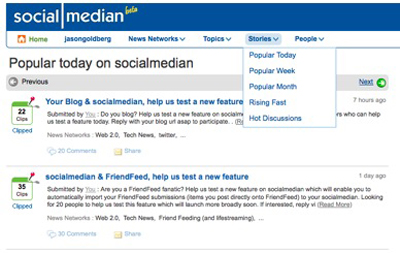

And finally, Social Median has entered the "most popular today" arena, displaying stories that have been deemed popular over the last day, week, month, or are rising fast. This falls in line with tweaks made at FriendFeed to show the best of day or week, and the many other sites dedicated to finding hot content, from ReadBurner to Techmeme.


This is an aggressive upgrade for Social Median, which we've been publicly watching develop since April, and one that's intended to get the site a bit more attention before their participation at the TechCrunch50 conference next week. With the addition of more news ingestion sources, popularity tools, and blogging widgets, its clear Social Median is looking to get more visible, more useful, and more robust. You can find my news stream at http://www.socialmedian.com/louisgray.
DISCLOSURE: I am an advisor to ReadBurner.

September 3, 2008

September 3, 2008 · 5 MIN READ · BY LOUIS GRAY

What Google Chrome Gets Right

What Google Chrome Gets Right

By Phil Glockner of Scribkin (FriendFeed/Twitter)

There has already been a lot of coverage of Google’s new browser, Chrome, including on this site (See Here and Here). But I think that it is premature to judge and execute this new product so early in its life cycle, I think time will tell if it becomes a strong contender against Internet Explorer, Firefox, Opera and Safari.

Therefore, I am not going to dwell on some of Chrome’s more publicized shortcomings. I will instead highlight a few features that Chrome gets right.

Learn About Chrome

Let me begin by pointing out that, true to Google’s “less is better” ethic, their download page is structured simply, with the download link prominent. The only other link, if you feel hesitant about diving in head-first, leads you to more information about the product.

Personally, I like this philosophy behind product presentation. None of the links are redundant, and the path to learning more about the product feels natural. Also, kudos should be given for the Chrome team embracing another new Google product, YouTube, in their presentation of the browser’s features.

First Effort

I think we need to remember that Chrome is Google’s first effort at a browser. Sure, they leveraged the maturity of the WebKit browser engine to give the browsing experience a solid, useful core. But in terms of development time, Chrome is competing against products that have been through at least one major revision, and in the case of IE, seven.

The advantage here is that they could really pick and choose the aims and feature set for their browser. The disadvantage, of course, is that they have to enter the playing field at a really high level, and the feature set they implement has to feel really mature. Even Firefox didn’t have to live up to that sort of scrutiny, since it was snapped up by the Mozilla team and its ‘grassroots’ status gave it a lot of protection as the rough edges were filed away.

Features Worth Noting

When I installed Chrome, the first thing I did is go to the help link. I have to admit that I had seen a mention of a “tab browser” that I wanted to learn how to activate. However, once I was there I really got distracted learning about the other features. I’d like to highlight a few that I think really stand out and are a clear response to what Google believes people would like to have natively in a browser.

Stealth Mode

The first unique feature that caught my eye was something Chrome calls incognito. If you have ever used a ‘mobile’ version of Firefox or Opera, you will get this mode. Basically, when you open an incognito tab, Chrome will not permanently record any of your browsing activity or cookies that are created in that tab. Once the tab is closed, all the cookies and history cached in memory goes away without a trace on your hard drive.

I have long thought that this is a feature that should be a native part of a browser for a while now. Whether I am surfing for a gift (as the Google documentation suggests) or … ahem … other things, I will definitely find this mode useful.

Much has been written about Google only respecting privacy when it benefits them. But this feature proves that they are in fact thinking about our local privacy when using a web browser. And with the rise of browser-based applications in the past year, I think this will become even more important.

Sandbox and Memory Management

One of the features that the Chrome team has taken pains to highlight is the products ability to partition off the memory usage of separate tabs and windows. While not a really flashy or obvious feature, I believe this is a critically important one, again especially as we move more into the browser-as-an-application space.

How many times have you clicked on a link from your email tab or from a browsing session and the flash or java app on the destination page made your entire browser crash? This has happened to me quite a few times, and I know for some people, this sort of situation is a regular occurrence.

With the built-in partitioning Chrome brings to the table, in theory, we may still have issues with certain pages behaving badly, but now this does not necessarily mean all your built-up context in other tabs and windows has to go away. Now, you can simply kill off the misbehaving page and go on with your life.

Management of this feature is through the use of Chrome’s built in task manager, which looks very similar to Windows’ task manager and will give you memory and network bandwidth of all your sessions at-a-glance. You have the ability to kill any tab or window off at any time.

Even cooler, there is a “stats for nerds” link that takes you to about:memory, a browser-generated page that gives you detailed information about the memory usage in each tab or window. This is a great insight into which pages take up the most memory, as well as Chrome’s total memory usage.

Speed

The last detail I would like to note for now is Chrome’s speed. Again, this is not a very flashy feature, as it is something that can only really be experienced through using the product for a while. But this is something that Google designers have been focusing on from the beginning. Chrome opens quickly, tab management is fast and pages render lightning-quick.

Of course, the proof is in the pudding, as they say. All freshly-installed browsers behave well and move quickly. However, over time they tend to either slow down, or eat up more and more memory. We’ll see if Chrome lives up to its promise of delivering a consistently speedy and nimble browsing experience.

Read more by Phil Glockner at Scribkin.com.

September 3, 2008 · 2 MIN READ · BY LOUIS GRAY

Toluu Takes On Tagging to Further Feed Finding

Toluu Takes On Tagging to Further Feed Finding

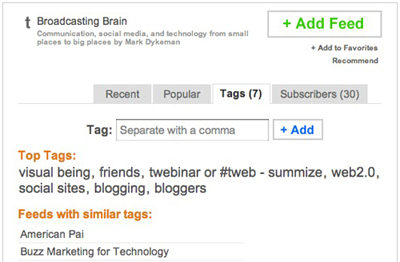
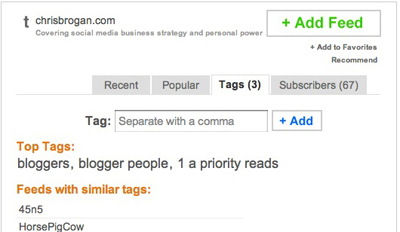
Toluu, the popular feed discovery engine and OPML sharing site, is making steps toward enhancing categorization and feed discovery with an update this morning, adding tags to feeds, and helping users find similar feeds by learning what other feeds carry the same tags, or seeing what tags other users' feeds share most frequently.

I spoke with Toluu developer Caleb Elston yesterday evening, and he told me "tagging has been the most requested feature" since Toluu launched back in March. By adding tagging to the vast majority of feeds, and letting users add new tags to feeds, he hopes this will improve users' ability to discover new content. So far, he told me, more than 35,000 tags have been added, even before it's reached the hands of the service's user base.


Beginning today, every feed in Toluu will feature a "tag tab", which will show existing tags for that feed, or let users add new ones. Smartly, the service remembers tags you have made in the past, and those will auto-populate, much like the behavior on Del.icio.us.


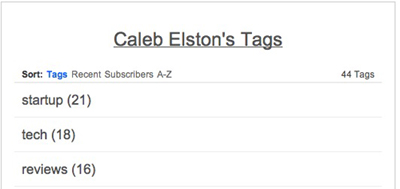
Also starting today, you can view any other Toluu user's list of tags most frequently subscribed to, in addition to their entire feed list, with a feature called "Profile Top Tags". Now, I can see if you commonly read up on Apple and Google, like startups or social media, and can traverse your tag cloud to see which feeds match those tags.


As the tagging engine hasn't hit the public market, it's clear there is more work to be done. Toluu leverages the categorization users place feeds in during OPML import, and while Caleb said Toluu scrubs for odd tags, I've seen a number of feeds with tags that look like they are the result of a single individual.

So far, Toluu hasn't made too many efforts to become a destination site. Instead, it's a utility that helps you find better RSS feeds, and learn what your friends are reading. But with the addition of tags, users may just be sticking around a little bit longer to fill out their RSS subscription to do list. If you still don't have a Toluu invite, which is nuts, you just need to ask me for one by leaving your e-mail address in the comments, or sending me a note to [email protected]. You can find my account here: http://www.toluu.com/louisgray/