Silicon Valley Technology Commentary & Archives · Est. 2006 3,033 Posts · 2006–2026

September 28, 2008

September 28, 2008 · 3 MIN READ · BY LOUIS GRAY

Five Creatively Obnoxious Things to Do With Social Media

Five Creatively Obnoxious Things to Do With Social Media

We're all too familiar with trolls or people who spout nonsense to get a rise out of you. The art of trolling is one much-perfected by few, and typically, despised by all. But there are less "in your face" ways to have someone scratching their head, trying to figure you out. Some are undoubtedly amusing, and I've been tempted to do them myself, if I didn't unfortunately have an inner moral conscious crying out for me to stop. This list is by no means inclusive, but none would be all that difficult to pull off, if you're in an incendiary mood.

1. Respond to very old e-mail as if there were no issues.

We've heard many people espouse the idea of "in box zero", but for most of us, it's not realistic. I've got e-mails I never answered in my in box going back a good part of two years. Sometimes, I think it'd be fun to start at the top, and respond to the old e-mail, without apologizing for my lateness, and continue the conversation from where it left off. Imagine the hilarity!

2. Pick somebody random on Twitter who is fairly active. Follow them, and then block them immediately.

Most Twitter users will give a new "follow" at least a cursory glance, and many will reciprocally follow. They'll likely be scratching their heads when it turns out you've blocked them and it's impossible for them to follow you back.

3. Use Twitter or FriendFeed to shout out someone's name with no context.

I've seen this happen a few times, when people accidentally post a name instead of searching for it. (For example: here) If you saw somebody post your name to Twitter without any reason or follow-up, wouldn't it drive you a little nuts trying to figure out what they were thinking?

4. Put somebody on a custom FriendFeed list that contains profanity or an odd name.

Earlier this month, resident crank and good friend Steven Hodson of WinExtra noticed somebody had added his data to a custom feed called "curmudgeons". As you can set up any names you wish, and there are no known filters, you can let your imagination run wild with just what you can name the lists. Then put people you know obsess over their stats and click through like mad.

So far, I haven't thusly been abused. Some of the referrals I've seen have me in "gurus", "noisy", "personal", "thetechnologylife", "professional", "sm-bloggers", and "pay-attention". So far, so good, but there's no doubt this could change. I'm just trying to stay off Mark Hopkins' "irksome" list, myself. (See also: Hutch Carpenter: How to Mess with Bloggers’ Heads Using FriendFeed Lists)

5. Set up a custom e-mail account for Disqus with an auto-responder.

If you have a Disqus account, leave a comment on a blog, and get a reply, you should receive an e-mail notification saying the conversation has continued. If you create a new e-mail account just for this, say from OtherInBox, you could set up your e-mail to reply to all new messages, saying you're out of the office, or something akin to "I receive a lot of e-mail and will answer yours in the order it was received".

This response will itself be placed in the comment thread of said blog, and be the owner's responsibility to delete, or could even lead to them responding to your out of office and have it continue. Heck, if you make the auto-responder creative enough, they may think you actually typed it yourself!

These are of course just scratching the surface. What other annoyances have you seen, or done yourself, that can be pulled off without being too destructive in nature? Have you done any of the above, and will you start now?

September 28, 2008 · 2 MIN READ · BY LOUIS GRAY

Is Your iPhone Ready for Some Football?

Is Your iPhone Ready for Some Football?

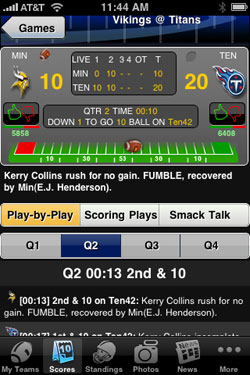
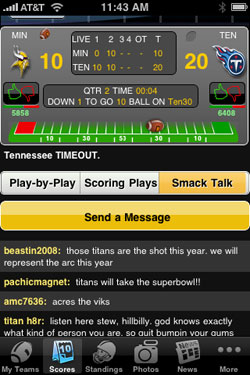
For much of the United States, and increasingly, other countries, Sundays in the fall and winter months are dominated by one thing - football. And just because you happen to be of a geeky mentality doesn't mean you can't nurture your jock side through using your iPhone to get updated in near real-time to all the happenings in the NFL. One of my favorite free apps on the iTunes application store is "Pro Football Live", which provides score updates, play by play, current game situations, photos, news, and even the ability to talk back to other users through a feature called "Smack Talk".
Apple's most recent iPhone ads have highlighted the application store, and specifically, some of the games that have been developed for the nascent platform. But there's more to entertainment than video games and high scores.


You Can See Updated Scores from Around the League


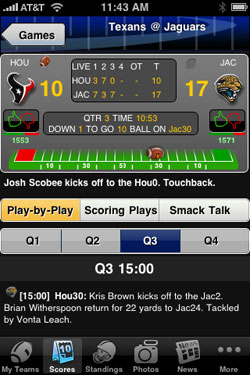
With Pro Football Live, I don't need to go to ESPN.com or Yahoo! Sports to get all the scoring updates, and even if I'm away from the TV or radio, I can get the feeling of watching a game, by seeing the current game situation, including who has the ball, yard markers, downs and yardage.


You Can Talk Smack And Check Current Standings


And while I'm not getting streaming video, by using the Pro Football Live app, unlike TV, I have access to all the games at once, not just those being broadcast in my area. So if you're a fantasy football junkie, like me, you can toggle between today's Raiders/Chargers contest, and that of the Texans/Jaguars or Jets/Cardinals. You can, with a couple clicks of the phone, be on top of your game, and you can jump into "Smack Talk" to share your thoughts with other fans.


You Can View Recent Photos and News from the NFL


Pro Football Live also features "News" and "Photos" feeds from the leading sources, letting you get updated on which starters are expected to play or which players set personal records.

iPhone applications like Pro Football Live and MLB.com's At Bat have helped me be closer to all games when away from home, taking pro sports mobile. It's all part of how products like the iPhone can better reach across the digital divide and get into America's living rooms, or at least, entertain those who would rather be in their living rooms, instead of slogging along behind their significant other who won't let them watch the game.

September 27, 2008

September 27, 2008 · 2 MIN READ · BY LOUIS GRAY

Will Future Information Consumption Be In Nested GUIs?

Will Future Information Consumption Be In Nested GUIs?

As Web technologies evolve, new, innovative ways to absorb information via the Web browser are being created. Some, like Google Reader, and blogs on SportsBlogs Nation are utilizing keyboard navigation, letting you type letters to jump from one new item to the next, while others let you move between screens by using the arrow keys, instead of clicking the mouse. An enterprising developer, Michael Buchanan, is hoping that nested GUIs, which he calls "Microspaces", will be a new way to approach navigation - letting you view a page within a page, within a page, all without opening a new browser window.

While he's just getting started with Microspaces, an initial trial site, called StoryLinez, has been posted, that brings top news sources for business, entertainment, health, news, sports and tech in one place. While that in itself is not new, the way the site operates is.


StoryLinez.com Wants to be a Hub for News On All Topics

Instead of clicking on an item, and getting a pulldown menu with multiple options, the nested GUI technology is triggered via mouse-over. For example, having your mouse over the "Business" section opens up a smaller window within a window, with sites ranging from CNN to Fox News, Yahoo!, Forbes and BusinessWeek, surfacing.


The Nested GUIs Technology Shows a Site Within a Site

Rather than send links off to a new browser window, as most sites do, putting your mouse over these news sources, and their resulting headlines instead shows the story in a section within your same window. And when you're done reading, move your mouse back to the listed options and get more stories. The goal? As Michael wrote me, "One of the things I wanted to accomplish was the ability to navigate everything without clicking." (See the blog for more)


You Can Click Through to Articles but Not Leave the Site

We've gotten used to flooding our Web browsers with new windows and new tabs. New Web 2.0 technologies are helping us to see the Web as a foundation for applications, which will need new ways to approach data. Could nested GUIs be one of the future ways we'll consume media? The StoryLinez site is fairly raw, but it's an interesting experiment. Could you get your news this way in the future? Michael hopes you will.

(Also See: TechCrunch: Microspaces: Playing With Nested GUIs from August 19th)

September 26, 2008

September 26, 2008 · 1 MIN READ · BY LOUIS GRAY

Disqus' API Launch Extends Commenting Possibilities

Disqus' API Launch Extends Commenting Possibilities

At Blog World Expo last week, I said that those services which "played well with others" would do better in a collaborative, cooperative Web 2.0 landscape over those that instead held tight to their walled gardens (See tweet from @drewolanoff.) It is through the launch of an API and extensive developer activity that services like Facebook, FriendFeed and Twitter have grown, often at the expense of those that didn't. Tonight, the popular Web commenting service Disqus joined the fray, launching a full public API.

The API (outlined here) lets services and tools write custom comment import and export tools, or to develop unique plug-ins for their platform. (see the announcement and coverage by The Inquisitr.)

Disqus comments are already among the most portable, enabling syndication through RSS, and into lifestreaming applications of all sorts. But what I found most interesting was the note on custom plugins for customer platforms. What's to stop developers from making a custom Disqus-enabled engine that is secure, and for the enterprise, essentially the comments equivalent of Yammer (versus Twitter)? What I see happening is that many of the social tools we may be using for community and entertainment in our world are now on the verge of making it to the enterprise. With an open development platform, and possibly, the idea to customize the comments engine for services that have enterprise capabilities, this could be one way to break on through to the other side, so to speak.

This week's big commenting news was Automattic buying up Intense Debate, something many thought would make Disqus' world a whole lot harder. Tonight's announcement shows they aren't sitting still and playing the part of victim. I'm eager to see the new services and tools that get developed as a result of being Disqus-powered.