By Mike Fruchter of MichaelFruchter.com (Twitter/FriendFeed)
In September,
FriendFeed launched the
redesign of their site, along with a new feature, lists. Friend lists are a way for you to help you organize your subscriptions into groups. In theory, it's a great system for trying to maintain an upper hand in controlling the voracious FriendFeed firehose.
So far, it's been approximately 60 days since I created and started using
my lists. I'm in the process of overhauling my list system and these are some of my observations thus far.
Organization works.The hard work is spent in the trenches, sorting members by interest, and creating the lists. Once the lists are established maintenance is relatively easy. Organization is the key for a better FriendFeed experience. Surf smarter on FriendFeed, not harder.
Create topical lists for your core interests only.I use FriendFeed for a multitude of purposes. I first use it for a business tool, then a tool for recreation and everything else. I spend a majority of my time in my "social media/tech" lists. I'm in the business of social media, so my core list reflects those interests. These lists are comprised of friends and bloggers I follow in the industry. There is power in numbers, but small numbers is the key to making topical lists work. Keep your focus lists smaller, this makes it more focused, and can be more meaningful. When you try to create lists for everything, you will face an unmanageable nightmare as your subscriber base grows.
Keep your lists small and focused.Trim the dead weight, and keep your core lists of focus small. Fifty or less should be a good starting point. Filter correctly, the goal is, information source quality and not quantity. You don't need several hundred voices echoing the same tune, when only the minimal is needed to produce the same results. The influential and key players are your authoritative voices for your core lists. Everything below this line should be branched off into a manageable new list.
Creating tiered lists equates to fake following.I find myself spending too much time in my social media/tech lists, so I created three tiers as an overflow buffer. My tiered lists, which is what I thought was a great idea at first, is flawed and actually has decreased my interactions with a large group of FriendFeed members.
Here is how I set them up initially:
Page A: This is my FriendFeed all star page. Highly active members who I have established connections with and interact with daily. I often network with them on other social networks and platforms. This is my core inner network.
Page B: Members with moderate activity. Moderate for me is not also your posting frequency, but the content you post as well. I usually have a good tolerance level for topics such as politics and religion. However, when it overwhelms my feed, you will have then made it to the b-list.
Page C: Members with low activity. This also serves as a holding tank for members I have yet to classify, and who are newly subscribed to me and vice versa.
The top tier A, gets my attention the most. The problem I'm now running into is the list has gotten too large, and I have certain members tagged in multiple lists. The A page is myFriendFeed all star page, but a lot of the all stars, such as
Robert Scoble also comprise of my social media/tech list. I have created duplication issues, because it's impossible to accurately label members, as most people have diverse interests in multiple topics. Lesson learned, keep it simple.
The second tier has become neglected, it's become a deserted highway I seldom travel anymore. To avoid letting these members be forgotten on my part, I will often upgrade them to page A. This brings them higher on the radar screen. When all else fails, I will use the red button, as outlined further below.
Page C was set up primarily as a holding tank for new subscribers that I have yet to classify. It has also inadvertently become a fake following list. I will peek my head in from time to time on that list, but as with page B, it does not get the time and amount of attention it should be receiving. The list is not totally flawed, the holding tank function also isolates the members with low FriendFeed usage, and for members whose feeds are filled with tweets about what they ate for dinner last night, along with repeated
Brightkite checkins etc etc. I still find occasional items of value on their feeds, so I don't unsubscribe, and I rarely use the hide function.
The holding tank is exceeding and quickly reaching full capacity. FriendFeed seems to be experiencing another growth spurt, they come in waves, and we are in the middle of one now. I welcome new followers, and if we share similar interests, I usually will reciprocate. The current rate at which the new follower notifications are coming in is faster than I can green light their security clearances for approval, out of the tank and into other lists. I do my best to review all new followers, and if the situation warrants it, I will reciprocate.
Now the holding tank has become the primary destination for new subs, with minimal chances of getting a review to visit the list deportation and destination department. So yet again, I will set up some time, and prune through these lists to make sure I spotlight and highlight new members for visits to the list deportation and destination dept.
Lists have helped me excel and manage certain interests and activities much more efficiently. The downside is, it leads to fake following and or a severe lack of attention for a minority of my follower base. I have just under 1,000 people subscribed to me, and I'm equally subscribed back to about the same. No matter how hard I try, it's impossible to accurately manage, organize and keep tabs on this amount of people.
Push the red button and take back your FriendFeed.
Finally I decided to take back my FriendFeed, I needed a lifeline. This drastic problem needed a drastic solution, and rather quickly. The solution, thanks to a tip from
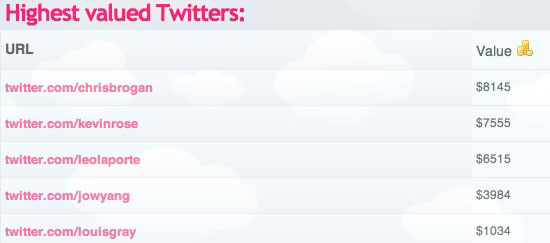
Louis Gray was to create a new list and bulk move my entire follower base to it. With lists, my dilemma was what to use the home feed for.
My home feed became an inactive and wasted feature. Instead of creating a new list, I added everyone back to my home feed, and the playing field has been evenly leveled. Although it's still a sea of people and content, it's the way the old FriendFeed was, and in some respects I like, and miss that.
Read more by Mike Fruchter at MichaelFruchter.com.
 When Mint.com first integrated the tracking of investments alongside bank records and credit cards this May, I was really excited to have a one-stop destination to see all my activity. But now, my weekly e-mails coming from the site are nothing short of a cross between a thrill ride and horror film, as one line stares me in the face: TOTAL. And peeking at the last three weeks' worth of updates shows that if I were to lose the average amount of money I lost each of the last three updates, my net worth would hit zero sometime in January of 2009. (Not on a percentage basis, but on an absolute value basis)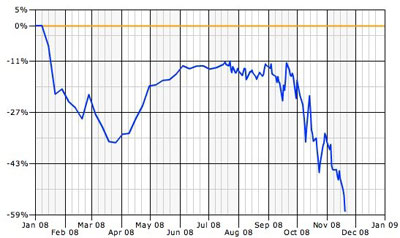
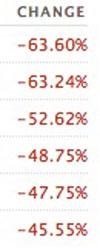 After a mild Spring and Summer that had my investments slightly trending downward, we all know what happened next - a massive cratering that has seen nearly everybody's financial situation turned upside down. 401ks and mutual funds that used to be stable and trusted are actually performing worse than the very worst individual stocks I've picked. One of the funds I am in dropped 24 percent last week, and another fell by more than 17 percent.
 Most people have heard the KISS acronym (Keep It Simple, Stupid). There is a very good reason for this. If you keep something simple, it is hard to mess it up. Why do I bring this up today? Well,