Silicon Valley Technology Commentary & Archives · Est. 2006 3,032 Posts · 2006–2026

June 8, 2009

June 8, 2009 · 2 MIN READ · BY LOUIS GRAY

Facebook Connect on My iPhone Games Is a Huge Win

Facebook Connect on My iPhone Games Is a Huge Win

When I attended the SXSW conference this March, I was able to see the announcement, by Dave Morin, the company's senior platform manager, that Facebook Connect would be integrated with iPhone applications, essentially adding the glue between the world's most popular social network with the digerati's most treasured mobile phone (a debut that was much anticipated). In the ensuing months, as I have seen Facebook Connect be added to more and more applications on my iPhone, I have really come to enjoy its benefits.

At the end of 2007, I said that the major benefit of having a Facebook account was for playing games with family, spread across the country.
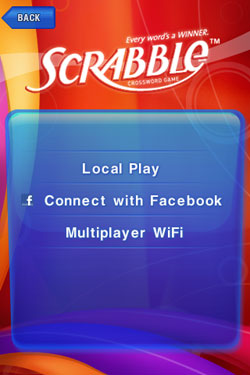

Connecting With Facebook from My iPhone Finds My Scrabble Games

I would guess that behind accepting new friend requests, the number one thing I use Facebook for is just that - playing games, such as Scrabble, with my family, or Scramble, a Boggle-like game I sometimes play versus Anna Billstrom, if for no other reason but to remember how much better she is at it than I am.
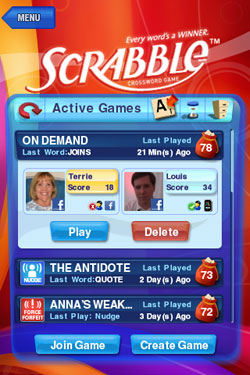
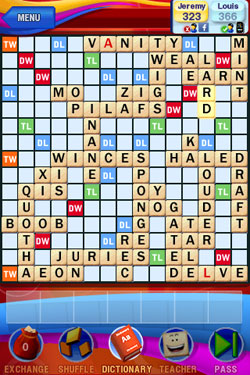

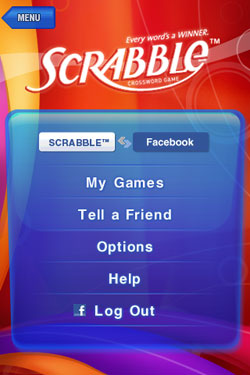
I Can See Both Active and Archived Scrabble Games from Facebook

Now, thanks to the Facebook Connect and iPhone app integration, I can play the same Scrabble games from Facebook on my iPhone. Just by clicking the app and seeing My Games in Facebook, I can play my active boards, or review archived games with a few taps of my finger. The experience, with the exception of screen size, is virtually the same - and it has let me make a few moves when I'm not attached to my laptop. (which also reduces my tendency to use online resources for better moves)

I haven't always been a huge fan of Facebook. I can't sit on it all day and respond to status updates. But the network has a ton of data on me in my social profile. I've already asked them to be utilized and help block ads that are don't make sense for me, even if they are still doing a bad job at it themselves. But now that I am seeing how easily they can be leveraged for apps, I'd like to see even more iPhone apps to look this direction and connect with the Facebook Connect platform to know the real me and get my data. It really can enhance the experience.

June 8, 2009 · 2 MIN READ · BY LOUIS GRAY

What Makes More Sense: iPhone Tethering or a Wireless Card?

What Makes More Sense: iPhone Tethering or a Wireless Card?

This week is Apple's annual Worldwide Developers' Conference (WWDC). Widely anticipated to be part of the week's festivities is the roll-out of an upgraded iPhone, and of course, its use of the long-awaited iPhone 3.0 software, which will contain a number of solid features, not the least of which is Apple-approved tethering, which would let you use your iPhone essentially as a wireless modem for your laptop, giving you Web access at 3G speeds.

Tonight, while driving back from the Sacramento area after a weekend at my parents, I got in the passenger seat, as my wife drove, and popped open the laptop to queue a list of e-mails, in an attempt to make sure I hadn't overlooked anything in the in box. But, like on an airplane with no WiFi, I couldn't check new messages, and my responses had to wait until the next time I was connected.

Meanwhile, I could always close the laptop, and look instead to my iPhone for the latest e-mails, and surf the Web, but on a smaller screen.

And that all seemed silly. My iPhone had the Web, and the laptop didn't. If the iPhone and computer were set up for tethering, I could leverage the iPhone's Web connection and use the computer's larger screen, its desktop applications and file archive.

And there's the second option - purchasing a dedicated wireless card.

I always had a tendency to mock the wireless cards I've seen added to other's laptops. My Macs have always had 802.11 embedded, and I try to stay close enough to WiFi, but if I had that wireless card in my MacBook Pro, I wouldn't ever really have to think about it. I could have surfed the Web in the car, and I could take the laptop to the park, making that my home office.

Both solutions have their positives and negatives, if I think too hard about it. I am already paying for the iPhone's unlimited data plan from AT&T, so cost would not be an issue, while, I would no doubt sap the iPhone's battery life. Also the clumsiness of making sure the two devices were connected, when I would like to remove wires, and not add more, would be annoying.

But I also don't want to set up yet another recurring monthly payment to fuel my technology addiction, so getting a wireless card that goes virtually anywhere seems like overkill.

We will find out on Monday if we are any closer to having an Apple-approved solution for iPhone tethering, and of course, if it works for the iPhone I have now, not just the next generation. If I have it, I'll try it out, for sure. But as I know a number of my contacts, such as Jesse Stay, have already sprung for the wireless card, what would you recommend? Should I just follow Apple like an unthinking sheep?

June 7, 2009

June 7, 2009 · 2 MIN READ · BY LOUIS GRAY

MLB's iPhone App Lets You Watch Any Game In Ten Minutes

MLB's iPhone App Lets You Watch Any Game In Ten Minutes

It's well-known that I am a big iPhone fan. It's almost as well-known that I'm also a huge baseball fan, and have been since I was very small. These two factors contributed to my buying the iPhone application from Major League Baseball a no-brainer before the season started. In addition to getting live "gameday" information for any game, box scores and a post-game recap for any contest, the application also features rich media, such as video highlights and audio coverage from both home and away squads - keeping me up to date to any contest, anywhere my iPhone can pick up a few bars from AT&T's 3G network, or over WiFi.


Condensed Game Recaps In Video Are Available Post-Game

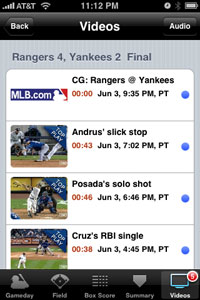
At some point in the last two weeks, MLB updated their application, adding a new feature that is extremely valuable if you want to rapidly get a recap of a game you missed - posting video summaries of the contest after every game, lasting only ten minutes or less.

Instead of some suit in a studio interpreting what they think are the best games to display, or the best highlights from each game for you to consume, you can see practically every play, condensed. If there was a hit, it will be there. A run, it's there. Strikeouts. Big plays. All of it.


This Yankees/Rangers Game Can Take Only About 7 Minutes

This is no three-hour time sink, that an archived game on TiVo would be. Today, I literally watched Saturday's Oakland A's game, from start to finish, as my wife drove to church. And with the abbreviated games, I can watch more than just my favorite team. I can see the Yankees play the Red Sox. I can watch the Tampa Bay Rays play their cross-state rivals, the Florida Marlins, or any rivalry, real or imagined. And I don't have to sit through stretches of well... stretching. Or spitting. Or scratching. I don't have to watch foul balls, or coaching visits to the mound. It's a rapid fire approach to the national pastime.


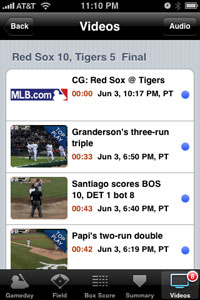
I Can See All the Plays, Big and Small, Quickly

If you are one of the many who already bought the MLB app for the iPhone, you've already got it. Find the condensed versions in the "Video" section of any game. If you don't have it yet, but love baseball, now would be the time.

June 4, 2009

June 4, 2009 · 1 MIN READ · BY LOUIS GRAY

Podcast: Incidental Interview on #BlameDrewsCancer, More

Podcast: Incidental Interview on #BlameDrewsCancer, More

Sheryl Breuker, who we recently featured in the 10 FriendFeeders to follow for May post, spoke with me yesterday for her Incidental Interviews series, and unlike many other podcasts I've done, she started off not by talking about every service we use, or about the latest tech gadgets.

Instead, she wanted to find out about some of our recent updates that have impacted us personally, and then we dived into geekery.

In the podcast, which I have embedded below, we discuss:
  • Drew Olanoff and the #BlameDrewsCancer phenomenon
  • My obtaining Robert Scoble's car
  • How we use FriendFeed
  • The Extended LouisGray.com team of writers
  • How we find new tools as an early adopter
  • Social media in business
  • Conflicts of interest between work and blog?
  • And more...
You can find Sheryl's site here: Stardust Global Ventures

Download the Recording Now or Subscribe in iTunes