Silicon Valley Technology Commentary & Archives · Est. 2006 3,045 Posts · 2006–2026

November 4, 2010

November 4, 2010 · 2 MIN READ · BY LOUIS GRAY

Buzzooka iApp Enhances Google Buzz Mobile Experience

Buzzooka iApp Enhances Google Buzz Mobile Experience

One could be forgiven for thinking all the development around the Google Buzz app ecosystem is weighted heavily toward Android. Sharing a corporate parent, integration between the two platforms, tapping into Google's location and maps database, and the close integration with Gmail besides has made the two a good pair. But there's still a ton of folks out there on iPhones and other Apple devices who have made Buzz part of their social experience. For them, one great option is a new app called Buzzooka - which not only has a fun name, but is fully-featured and intuitive as well.

Available for $1.99 on the iTunes store, Buzzooka replicates the Buzz experience, providing streams from those you follow, a link to your own Google profile, a tab for nearby updates to the stream, and integrated people search. But while Google keeps Buzz embedded in Gmail, making the experience at times feel heavy and slow, Buzzooka just flies - with the most well-known equivalent being that of Twitter for the iPhone. It even offers the option to pull down to refresh.
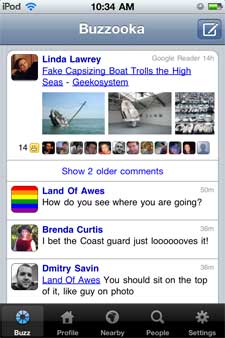
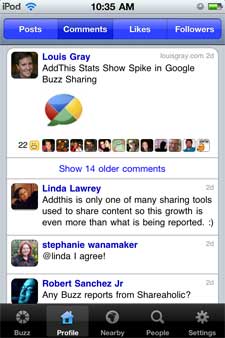
   
Seeing Active Buzz Threads in Buzzooka from My Stream and Profile


In Buzzooka, Google Buzz entries display the user's avatar and shared content. You can click on any piece of content to add a like or a comment, mute the thread, or visit the poster's profile. The app lets you see active comment and like streams, complete with small avatars for those engaging, and jump in yourself, or simply post updates directly from within the app.


   
Viewing Rich Content and HTML In Buzzooka


Buzzooka has some nice twists in the app, especially for being so new. First, the app displays full Web content within itself instead of launching you to the iDevice's Safari browser. Second, it even plays rich media content, such as YouTube videos, which may have been shared. And if you click over to the "Nearby" tab, and scroll through recent updates in your area, the embedded Google map shifts along with the user's location as provided.
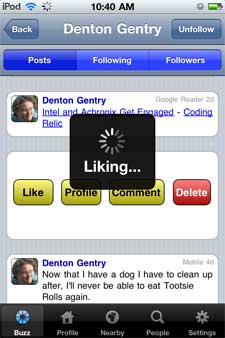

   
Liking an Entry in Buzzooka, Scrolling Nearby Updates


You can configure the Buzzooka experience to show a specific number of posts per screen, and a predetermined number of comments per post. The most active discussions are collapsed, showing the first and last, with the option to expand.
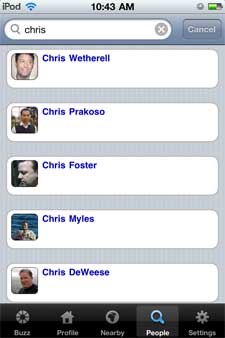
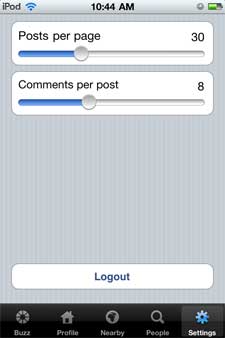
   
Searching for People, Changing Prefs in Buzzooka


Buzzooka leverages the Google Buzz API, of course, just as many other clients, including TweetDeck, Seesmic and my6sense have. The greater the partner ecosystem, the greater the network's chance for continued growth.

You can find Buzzooka on the iTunes Store here.

Disclosure: I am vice president of marketing for my6sense. Our Android App also offers Buzz consumption and interaction, which could be an assumed competitor to Buzzooka. Also, we are active Google Buzz API partners.
November 4, 2010 · 2 MIN READ · BY LOUIS GRAY

Sonos' Wireless Dock for iDevices: Simple and Sweet

Sonos' Wireless Dock for iDevices: Simple and Sweet

The last year has forever changed the way I consume and enjoy music. The addition of Spotify to my life (and soon the rest of you in the US) made iTunes a vestigal program good only for synching iPad apps. The addition of Sonos leveraged the power of the Web to tap untold number of electronic music streams from around the world, wirelessly throughout the house. That's why I followed my initial test unit with the purchase of two more, and why my YouTube account is full of videos of my kids rocking out to great sound. Today, a small companion piece, a wireless dock for both iPod and iPhone, arrived in my home, and it makes getting music trapped on all those iDevices incredibly simple to get onto my Sonos. It's simple, small, and sounds great.

Thanks to an address mixup, my review wireless dock unit reached me today, a week or so after the true gadget blogs got their hands on the device. But that didn't make the experience any worse for the wear. After opening the envelope marked "Urgent", the device was streaming music from my iPod Touch to my Sonos players in five minutes or less.

The Sonos S5 systems I have in my home are notable for two primary things - there is no digital display, making the device appear as one big speaker, and also, no way to push physical media. No CD slot. No tape deck. No iPod Dock. The Wireless Dock for iPhone and iPod fills that gap, for the many Apple geeks who want to get music from their iTunes to the best speakers in the house.

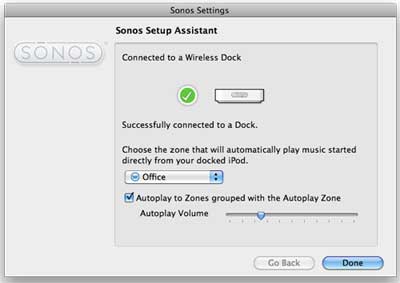
Adding the Wireless Dock to Sonos, With AutoPlay in the Office

Setting up the device was truly simple. I plugged it in, added the component to my network using Sonos' desktop software, and it saw my iPod as a music source. Now, I can stream the content from this device (or any friends' devices they bring with them) just by plugging it in and selecting it from Sonos. There's still something magical about clicking pause or play on the computer and having it stop a device wirelessly, but Sonos gets it done. I can even control my iPod Touch with my Android phone using the Andronos software on the Android Market.


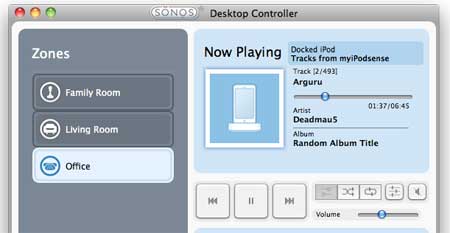
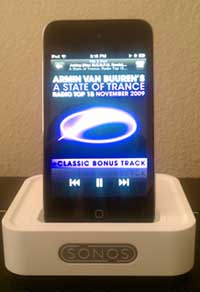
My Docked iPod Can Stream to My Sonos Speakers

The retail price for the wireless dock is $119, so it's not the cheapest peripheral ever, but it's a solid add-on for existing Sonos equipment owners, and the device is polished enough to have been made by Apple itself. To be honest, Sonos' hardware is some of the best designed gadgetry in the business, beautiful enough to sit in every major room in my house. That they also have access to all my best sound makes music to my ears.

Disclosure: I received the wireless dock from Sonos for free. I received my initial Sonos S5 unit free of cost as well, and have since purchased multiple devices. In theory, I should tell you I also have free access to Spotify Pro as well, but I'd pay for that too if given the chance. :)

November 2, 2010

November 2, 2010 · 2 MIN READ · BY LOUIS GRAY

Lazyscope: An Immersive Twitter Desktop News Experience

Lazyscope: An Immersive Twitter Desktop News Experience

As Twitter becomes an increasingly valuable resource for consuming new content online, replacing RSS for many and augmenting it for others, new and inventive ways to visually deliver this content are being developed, including the ability to "unpack" URLs to provide a preview and excerpt of the shared link - and in some cases, the option to display the entire article altogether. The #NewTwitter release introduced the concept of a rich media pane to the Web. Today, the team behind Lazyfeed releases Lazyscope, a full-fledged Twitter consumption app to help you read all the news in one place. And as a kicker, you can even use it as a full-fledged client.

Lazyfeed made its name initially as an intuitive Web-based RSS client that followed real-time streams to discover keywords you had selected to follow. Its latest release introduced social features to help people follow collections of items and discover what your friends thought were cool. With Lazyscope, the team has extended its reach to the world of Twitter and has developed a cool and immersive way to find content from your stream as it comes in.

Lazyscope Displaying News from Links In Line

Like most desktop Twitter clients, Lazyscope delivers new tweets in a column format, first delivered by TweetDeck. The newest tweets are at the top, with oldest chronologically below. Every tweet that contains a link offers an unpacked long URL, the headline of the article and the first paragraph of that piece. Clicking on the tweet itself displays the full content of the page, including imagery or video, in the right hand pane.

As new updates come in, they await your command to approve as they stack up, just like on the regular Twitter Web site. (2 new updates, 19 new updates, etc.) Also, a notification in the bottom right hand corner alerts you to new entries that may catch your eye. Like the original LazyFeed, the flow itself is addictive.

Lazyscope Makes Reading Twitter News Easy

While the objective of Lazyscope is primarily as a consumption tool, the developers, led by Ethan Gahng (@ethpresso) have included the option for you to post updates from Lazyscope, check mentions by hitting the @ symbol, or check direct messages with the small envelope in the top left corner. You can also select lists to which you are subscribed from the bar next to your avatar.

Alerts from Lazyscope as You Read

But the fun's not done with just Twitter. If you want, you can add subscriptions to RSS feeds within LazyScope, either by subscribing to the news source in the right hand pane, or clicking the + sign in the top right and entering a valid URL. Lazyscope will do the rest, and provide updates from that feed in your column, just like any other news source.

Subscribe to Any Feed Within Lazyscope

In a world when most Twitter clients are quite similar, Lazyscope is one of the coolest and most innovative options I have seen in a long time. This seems to bridge the gap, like Flipboard did on the iPad, to bring a true reading experience to the desktop.

You can find Lazyscope at http://www.lazyscope.com/. They are on Twitter at @lazys.
November 2, 2010 · 2 MIN READ · BY LOUIS GRAY

OpenID Foundation Finally Grabs @openid Twitter Account

OpenID Foundation Finally Grabs @openid Twitter Account

The OpenID protocol, aimed to authenticate users in a decentralized way, helping individuals own their own identities instead of requiring unique accounts for every service, has had something of an ironic issue for some time - given that the OpenID Foundation didn't actually own their own ID for one of the more popular discussion forums out there - Twitter. Today, this issue can be put to rest as Facebook employee and open source advocate David Recordon announced this afternoon they had gained access to the @openid account - giving folks a central place to keep tabs on updates to the protocol.

While OpenID at times has been pilloried for being obtuse, making logins more complicated rather than less, the project has helped push the concept of decentralized identities away from individual domains, including last week's news that Flickr had adopted the standard. The protocol, developed by now Google employee Brad Fitzpatrick in 2005, while at Six Apart, has seen deployment at a significant and influential number of Web services, and has corporate members including Facebook, Google, IBM, Microsoft, PayPal and Yahoo! on the foundation's board of directors. Ironically, nobody from Twitter is involved on the board.

The release of the account may or may not have been related to yesterday's OpenID OAuth Summit, held at Facebook headquarters, which saw stakeholders from a variety of tech companies, including Kevin Marks of BT, Chris Messina and Joseph Smarr of Google and Tantek Çelik, computer scientist at Microformats.org, participate to potentially discuss the differences between the at times complimentary but competing formats. Also, the Internet Identity Workshop (IIW) kicks off today in Mountain View, where many of these same folks will be participating.

Debate on OpenID versus OAuth continues to rage on the Web, of course. Recent entries include the Halloween post on Codebase: OpenID OR OAuth – That is the Question. Regardless of the eventual resolution, proposed as a new agreement called OpenID Connect, adoption of open standards and reduced complexity is a good thing. You can now follow OpenID's happenings at @openid.